28% OFF
Verified today
Selected items only

This page lists the currently available Gamma promo codes.
🔔 Get notified when Gamma has a sale
New promo codes are added as soon as they become available!
🔎 Explore available Gamma promo codes
All promo codes on this page are manually verified, and expired codes are clearly marked.
Invalid codes are removed promptly to keep this page accurate. Final availability and discount details are confirmed at checkout.
Gamma savings come from two places: annual billing on the official pricing page, which the page describes as saving up to 28% compared with monthly billing, and promo codes that Gamma itself issues, which you type into the promo code field at checkout. The annual price is shown before you sign up, while a promo code only works on your first move from the Free plan to a paid plan.
Before you count on a Gamma promo code, check which plan and billing cycle it covers. The Gamma help center says codes cannot be used to upgrade between paid plans, such as Plus to Pro, that only one code can be used per purchase, and that some codes apply only to specific plans or billing cycles. Some discounts cover only the first billing cycle.
Prices on the pricing page are per seat, and the page notes that tax may apply depending on your location. Compare the order summary at checkout rather than the plan card. Gamma pricing.
A Gamma discount can come from annual billing or from a promo code, and each one changes a different part of the price.
This shows which Gamma offer gives the lowest real cost for the number of decks, docs and sites you plan to create.
A Gamma plan is a recurring subscription, so the code, seat, cancellation and refund terms matter as much as the first price.
Read the Gamma refund policy before paying.
To use the current Gamma offer, follow the steps below.
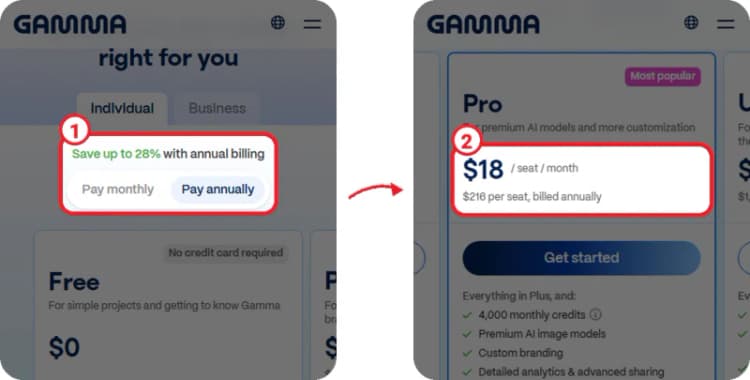
① On the Gamma pricing page, choose "Pay annually" under "Save up to 28% with annual billing".
② The Pro card then shows $18 / seat / month and "$216 per seat, billed annually".
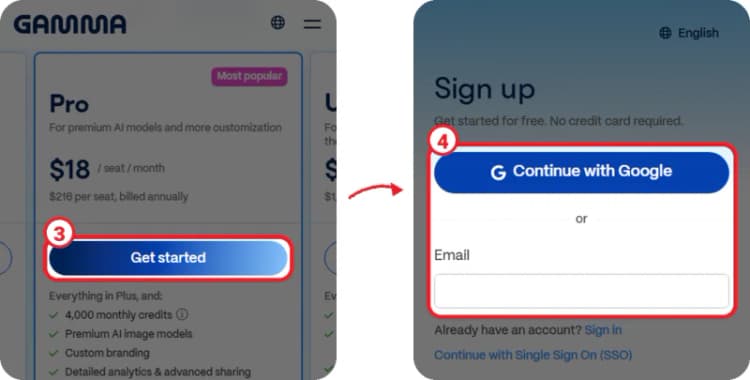
③ Tap "Get started" on the plan you want.
④ Sign up with "Continue with Google" or your email. No credit card is required to create the account.
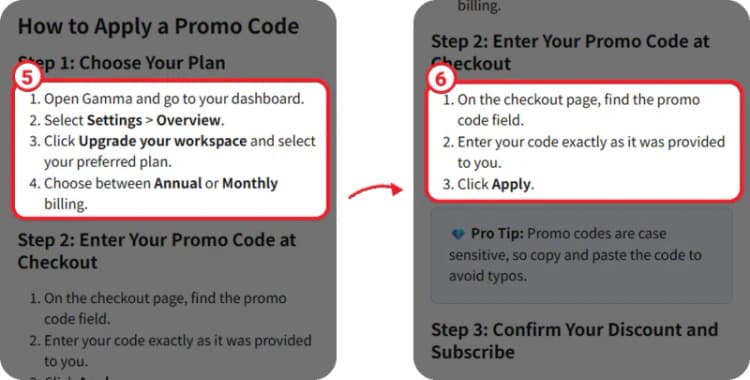
⑤ In your dashboard, select Settings > Overview, click "Upgrade your workspace", select your plan and choose Annual or Monthly billing.
⑥ On the checkout page, find the promo code field, enter your code exactly as provided and click "Apply".
Check that the discount appears in the order summary and that the total has updated before you enter your payment details and click Subscribe.
A Gamma promo code can be real and still not apply, because each code is tied to its own plan, timing and account status.
If the discount does not appear in the order summary, do not complete the purchase. To add a code to an active subscription, contact Gamma support.
Yes. The pricing page says you can save up to 28% with annual billing. Pro is $18 per seat per month billed annually instead of $25 billed monthly, and Plus is $9 instead of $12.
Go to Settings > Overview, click "Upgrade your workspace", pick your plan and billing cycle, then enter the code in the promo code field at checkout and click "Apply".
No, not at checkout. Codes can only be redeemed when you move from the Free plan to a paid plan for the first time. To use a code on an active subscription, contact Gamma support.
Gamma accepts all major credit and debit card brands, and you can also pay directly via any US or EU bank. UPI payments are supported for customers in India.
Your content remains yours. If you downgrade or cancel, you keep access to all the content you created, but some advanced features may be limited.
Try Gamma on the Free plan first with the 400 signup credits, then pick a paid plan by the monthly credits you will actually use. If you plan to keep it for a year, annual billing is the steady saving, up to 28% on Pro. If you have a Gamma promo code, use it on your first upgrade from the Free plan, because it cannot be added later at checkout, and confirm the discount in the order summary before you click Subscribe.