40% OFF
Verified today
Selected items only
This page lists the currently available Artlist promo codes.
🔔 Get notified when Artlist has a sale
New promo codes are added as soon as they become available!
🔎 Explore available Artlist promo codes
All promo codes on this page are manually verified, and expired codes are clearly marked.
Invalid codes are removed promptly to keep this page accurate. Final availability and discount details are confirmed at checkout.
If you're shopping from Canada, the best Artlist saving is listed on the official pricing page. Yearly billing puts a "Save 40%" label on the AI Suite plans: AI Starter goes from US$19.99 to US$11.99 per month, AI Core from US$39.99 to US$23.99, and AI Creator from US$69.99 to US$41.67, all billed annually. On the Stock Catalog side, Music & SFX starts at US$9.99 per month. Max, which bundles the stock catalog with the AI tools, costs US$39.99 per month billed annually.
Before you rely on an Artlist promo code, look at the plan and the billing cycle. The 40% price applies only to yearly billing, and a yearly plan is charged for the full year upfront. Monthly billing is offered only on the Music & SFX Social and AI Suite plans, while annual billing is available on every plan. Prices exclude VAT and local taxes, which are calculated at checkout.
Any Artlist discount depends on the plan family and the billing cycle, so compare like with like.
Choose the plan based on the credits and assets you'll use each month, then set the yearly total against the monthly price.
Artlist plans renew automatically, so the billing and licence terms matter as much as the opening price.
To get the current Artlist offer, follow these steps.
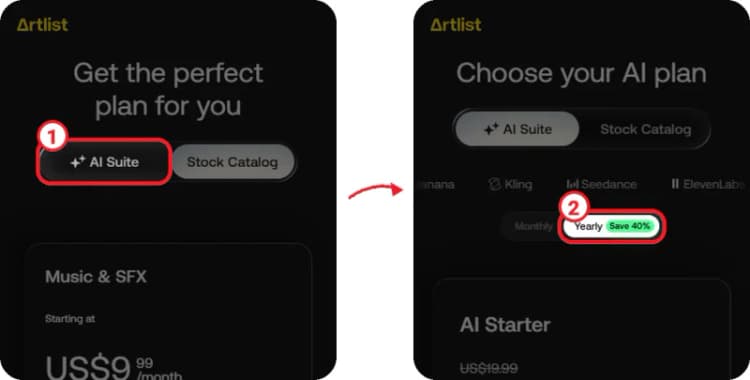
① On the Artlist pricing page, tap "AI Suite" to see the AI plans.
② Switch billing to "Yearly", which is marked "Save 40%".
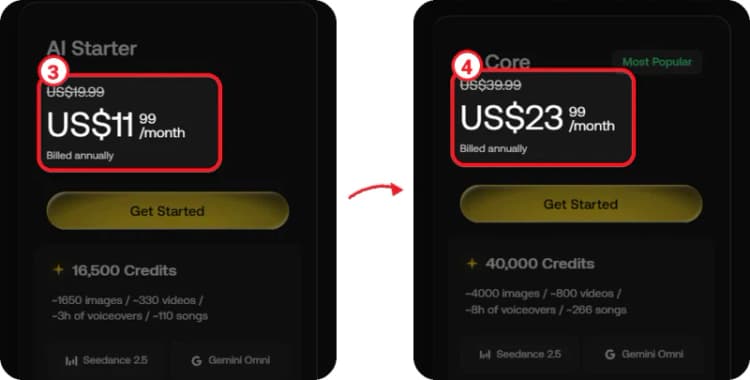
③ The AI Starter card now shows US$19.99 crossed out and US$11.99 /month, billed annually.
④ Scroll down to AI Core, which shows US$39.99 crossed out and US$23.99 /month, billed annually.
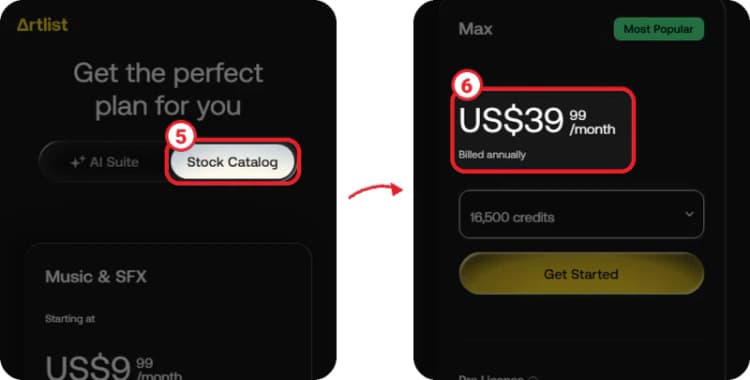
⑤ If you want stock music, footage and sound effects, tap "Stock Catalog" instead.
⑥ The Max card shows US$39.99 /month, billed annually. Tap "Get Started" on the plan you want and create your account to continue.
The yearly price appears on the plan card before you pay, so you don't need a code to get it. Check the plan, the credits and the total billed for the year before you complete the purchase.
An Artlist offer can be genuine and still not appear, since each one is tied to a specific plan and billing cycle.
Check the plan card and the total due before you pay instead of assuming a discount will turn up later.
The pricing page marks the AI Suite plans "Save 40%" with yearly billing. AI Starter is US$11.99 per month instead of US$19.99, AI Core is US$23.99 instead of US$39.99, and AI Creator is US$41.67 instead of US$69.99, all billed annually.
Yes. You can generate free voiceovers, images, a video and music to test Artlist's AI tools. A free trial account has no time limit and stays free unless you subscribe to a plan.
Artlist refunds payments made within the last 14 days, as long as no assets have been downloaded, generated or used in a project. This covers new subscriptions and renewals. Payments older than 14 days, or plans that have already been used, are not refunded.
Artlist accepts credit cards, PayPal, Google Pay and Apple Pay. Apple Pay works only in Safari on macOS or in any browser on iOS. Purchase orders and bank transfers are not accepted.
Yes. The Stock Catalog plans cover stock music, sound effects and footage. Music & SFX starts at US$9.99 per month, and Max adds footage, templates, LUTs and the AI tools for US$39.99 per month billed annually.
The biggest Artlist saving comes from yearly billing on an AI Suite plan, which takes 40% off the monthly price. Pick the tier based on the credits you'll actually use, since a yearly plan is charged for the full year upfront, and try the free AI samples first. If you need stock music and footage along with the AI tools, compare Max at US$39.99 per month billed annually against an AI plan on its own, and keep in mind that refunds stop once you download or generate anything.