

10% OFFCODE
Verified today
Hotels onlySelected items only
Recently used: Today78 people used
Did this code work?

This page lists the currently available Booking.com promo codes.
🔔 Get notified when Booking.com has a sale
New Promo Codes are added as soon as they become available!
🔎 Exploring available Booking.com Promo Codes
These promotion codes have expired. Some may still work if you try them.
This promotion code is currently expired
This promotion code is currently expired
This promotion code is currently expired
This promotion code is currently expired
New Promo Codes are added as soon as they become available!
🔎 Exploring available Booking.com Promo Codes
All promo codes listed on this page are manually verified, and only currently working official promo codes are shown.
Expired or invalid codes are removed promptly to ensure accuracy. Actual availability and discount details are subject to the checkout page.
Booking.com may provide promo codes, member rates, mobile deals and other limited-time promotions alongside Genius benefits. Availability and eligibility can vary by property, stay dates, account and campaign.
Compare the final price across the rates available for your exact booking, including taxes, fees, cancellation terms and any eligible Genius or coupon-code benefit. Do not assume a first-order discount is always available.
Booking.com promo codes may not work due to the platform’s pricing model and restrictions. A Booking.com promo code can also be subject to property, account, stay-date, payment, or campaign conditions.
Booking.com Genius is free to join. Level 1 is available after creating a free account and signing in, with 10% off eligible stays and 10% off select rental cars. Level 2 is unlocked after 5 bookings within 2 years and can provide 10–15% off eligible stays, 10–15% off select rental cars, plus free breakfast or room upgrades at select properties. Level 3 is unlocked after 15 bookings within 2 years and can provide 10–20% off eligible stays, 10–15% off select rental cars, selected breakfast or upgrade benefits, and priority support on stays.
Genius rewards are applied automatically where eligible, so no promo code is needed for a Genius rate. Discounts are applied before taxes and fees. Always check the exact benefit displayed for your property and booking.
Compare the same property, room type and dates across standard, mobile and eligible Genius rates. Check taxes, fees, cancellation terms and payment timing, then use the final payable total as the comparison point rather than assuming one booking day or travel category is always cheaper.
To redeem a Booking.com discount code, follow the steps below.
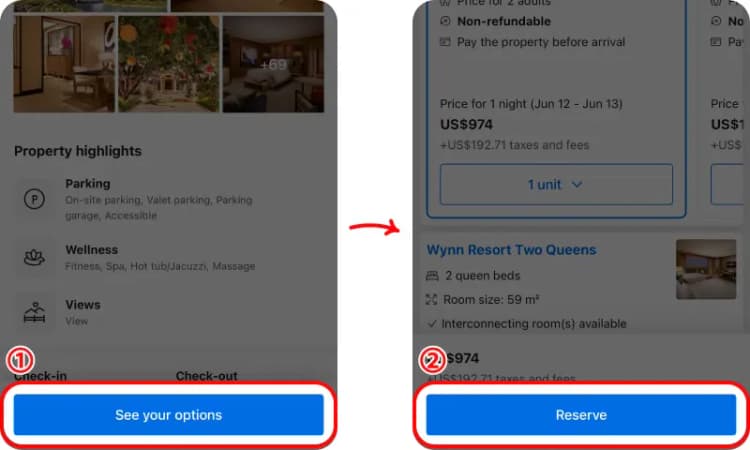
① On the property page, tap “See your options” to view available rooms.
② Select your room and tap “Reserve” to proceed.
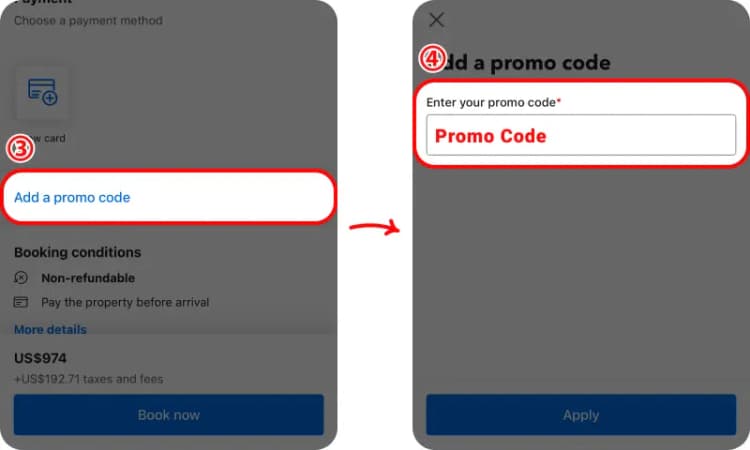
③ If a specific Booking.com promotion provides a promo-code field for your booking, open that field during checkout.
④ Enter the code exactly as provided, apply it, and confirm that the final payable total changes before completing the booking.
Most Genius savings do not use a code at all, and a promo-code field is not shown for every booking. Compare any eligible code with the Genius, mobile and property-specific rates already available for the same stay.
Booking.com may offer promo codes alongside Genius member rates, mobile deals and other targeted promotions. Check the current offers on this page and compare the eligible options before booking.
The best Booking.com saving depends on the offers available for your stay. Compare current promo codes with Genius rates, mobile deals and other eligible promotions to find the best final price.
Check whether the Booking.com code has expired, whether the selected property and dates are eligible, and whether any account or booking requirements apply. You can also compare other current offers on this page.
Booking.com offers the Genius loyalty program, with eligible discounts or property-specific benefits depending on account level, property and booking conditions. Check the benefits shown for your booking before confirming.
Review the property, room type, cancellation policy, payment timing, taxes and fees, and the final price for your exact dates. Benefits and support conditions can vary by reservation, so confirm the booking terms before paying.
Booking.com savings often come through property-specific prices and Genius eligibility rather than a universal public promo code. Compare the same room, dates, payment timing and cancellation terms while signed in. Genius or targeted rates can vary by property and account, so use the final payable reservation total as the comparison point.