30% OFF
Verified today
Valid sitewide

This page lists the currently available SimKeep promo codes.
🔔 Get notified when SimKeep has a sale
New promo codes are added as soon as they become available!
🔎 Explore available SimKeep promo codes
All promo codes on this page are manually verified, and expired codes are clearly marked.
Invalid codes are removed promptly to keep this page accurate. Final availability and discount details are confirmed at checkout.
SimKeep sells prepaid travel eSIMs for more than 190 countries and regions. For shoppers in Singapore, the main saving is already in the plan prices: each plan card shows a crossed-out regular price beside a lower "Your price", marked -30%. On the United States page, for example, the 3 GB plan for 30 days is $6.96 instead of $9.94, and the 10 GB plan is $14.82 instead of $21.17.
Before you add a SimKeep promo code, look at the plan itself: how much data it gives, how long it is valid and where it works. SimKeep plans are internet only, with no calls or SMS. Each plan page also states how long you have to activate it, such as "Can be activated within 180 days after purchase" on the United States 100 MB plan.
A SimKeep discount can come from the reduced plan price, from a promo code entered on the plan page, or from both, so compare the final price of each plan.
That comparison shows whether a code beats the price SimKeep already displays.
An eSIM that has been activated cannot be returned, so run through these points before paying.
If an eSIM fails to activate because of a technical fault on the side of SimKeep or the network operator, the refund policy provides for a refund or a replacement eSIM.
Here is how to use a SimKeep voucher code, step by step.
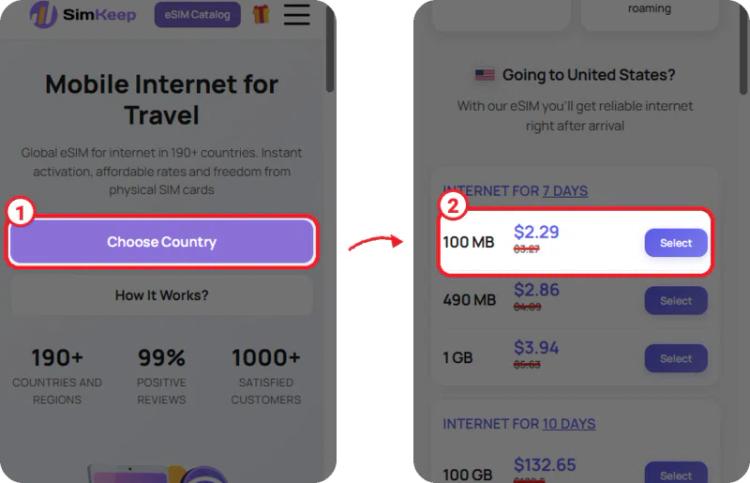
① On the SimKeep home page, tap "Choose Country" and select your destination.
② Compare the plans on the country page. Each one shows the reduced price with the regular price crossed out above it, such as United States 100 MB at $2.29 instead of $3.27.
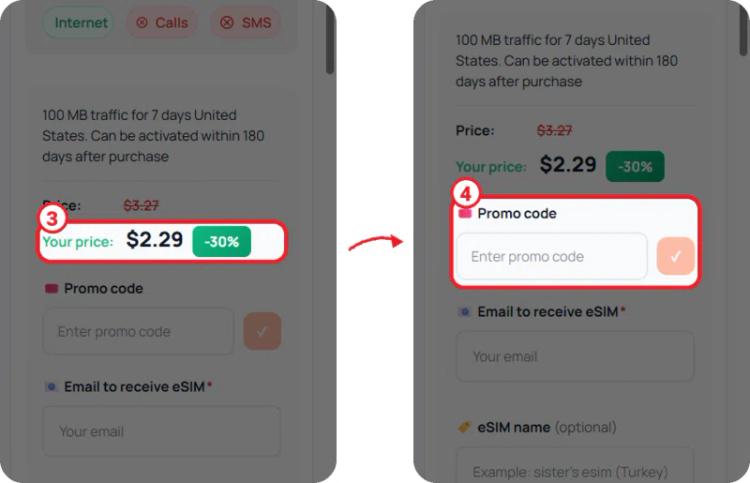
③ Tap "Select" on a plan to open its page, then check "Your price" and the -30% label.
④ Enter your code in the "Promo code" box and tap the check button beside it.
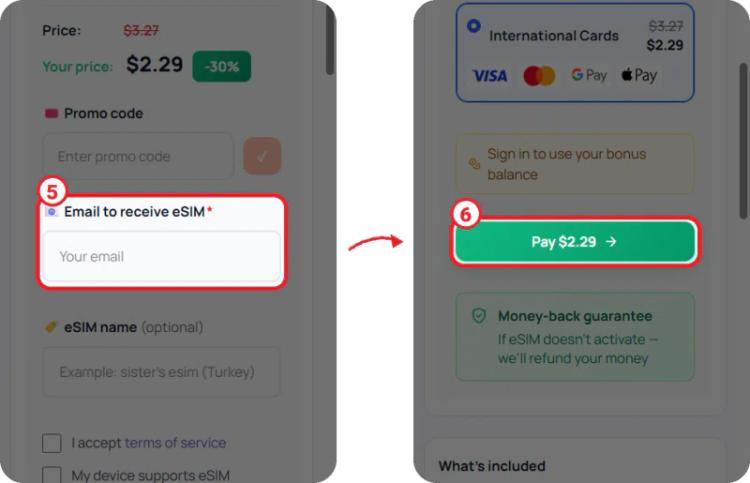
⑤ In "Email to receive eSIM", enter the address where the eSIM should be sent, then tick the terms and device boxes.
⑥ Look at the amount on the "Pay" button before you move on to payment.
Make sure the price on the Pay button goes down once the code is accepted, and only then confirm your order.
A SimKeep code can be genuine and still leave your price unchanged, since each code comes with its own terms.
If a code fails, contact SimKeep support through the site chat or its Contacts page before you pay.
Every SimKeep plan page has a "Promo code" box, and plan prices are currently shown 30% below the regular price, such as United States 3 GB for 30 days at $6.96 instead of $9.94.
The QR code is emailed to the address you enter on the plan page straight after payment. Scan it in your phone settings to install the eSIM.
Only in set cases, such as an eSIM that was never activated, or one that does not work because of a technical fault or missing coverage. After activation there is no refund for a change of plans, or if the phone does not support eSIM.
No. SimKeep plans are mobile internet only. You can still call and message through apps such as WhatsApp, Telegram or Viber, and share the connection with other devices.
Yes. SimKeep is an online store with eSIMs for more than 190 countries and regions, delivered by email, and prices are shown in USD. International card payments are handled by its payment partner, and the payment page shows the final amount and currency.
Pick the plan that suits your trip length and data use, then compare the price per GB on the country or regional page. Try a promo code in the "Promo code" box and keep whichever price is lower on the Pay button. Install the eSIM at home on Wi-Fi before you fly, and read the plan's activation rules so its validity does not start too early.