

20% OFFCODE
Selected items
This page lists the currently available KKday promo codes.
New Promo Codes are added as soon as they become available!
🔎 Exploring available KKday Promo Codes
All promo codes listed on this page are manually verified, and only currently working official promo codes are shown.
Expired or invalid codes are removed promptly to ensure accuracy. Actual availability and discount details are subject to the checkout page.
KKday offers first order promo codes for new customers, typically providing discounts on activities, attraction tickets, and local travel experiences. By signing up for an account or using the mobile app, new users can receive a KKday promo code or coupon code that can be applied at checkout for instant savings.
Unlike some experience platforms, KKday frequently releases region-specific promo codes and campaign-based discounts, especially for popular destinations in Asia. These codes can provide additional savings on tours, transportation passes, and attraction tickets depending on the destination.
KKday also runs time-limited promotions, app-exclusive deals, and seasonal campaigns tied to travel demand. For maximum savings, travelers should apply available promo codes, check destination-specific offers, and book in advance to secure lower prices. Combining coupons with regional promotions and limited-time deals is the most effective way to save on KKday.
KKday promo codes and coupon codes may not work due to specific restrictions or conditions.
KKday offers discounts through promo codes, first order deals, and app-exclusive promotions.
Users can save on tours, attractions, transportation, and travel experiences, with frequent destination-based deals and limited-time campaigns.
For the best savings, apply a KKday promo code and combine it with app discounts or seasonal offers.
To redeem a KKday promo code while making a booking, follow the steps below.

① On the activity or tour page, review the details and tap “Add to Cart” or “Book now.”
② Select the session time, quantity, and required options, then tap “Next” to proceed.
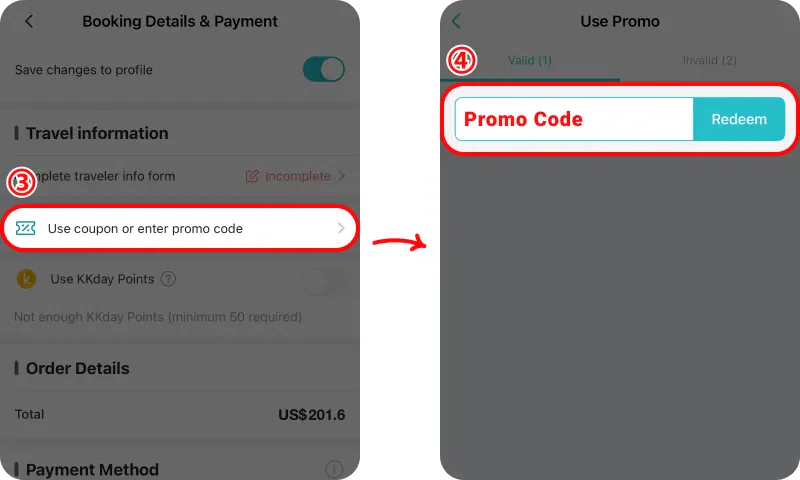
③ On the Booking Details & Payment screen, tap “Use coupon or enter promo code.”
④ Enter your promo code in the field and tap “Redeem” to apply the discount.
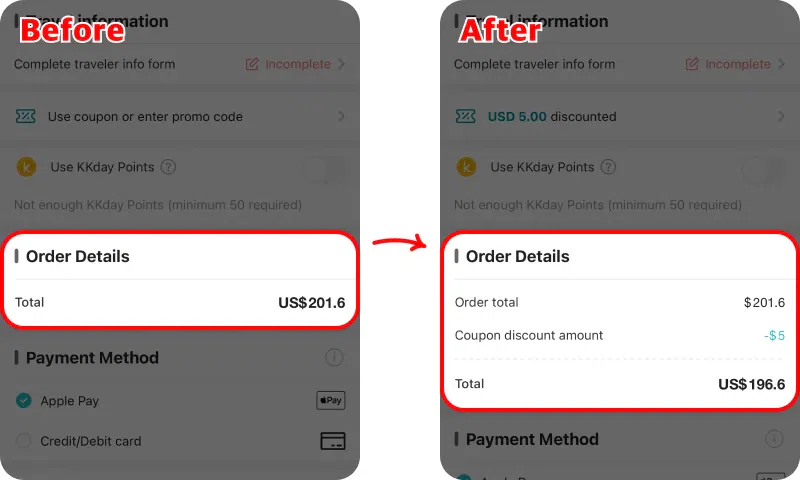
Before applying the promo code, the order total shows US$201.60 with no discount applied.
After the promo code is redeemed, a US$5.00 coupon discount is applied, reducing the final total to US$196.60.
You can also register a promo code in your account before booking.
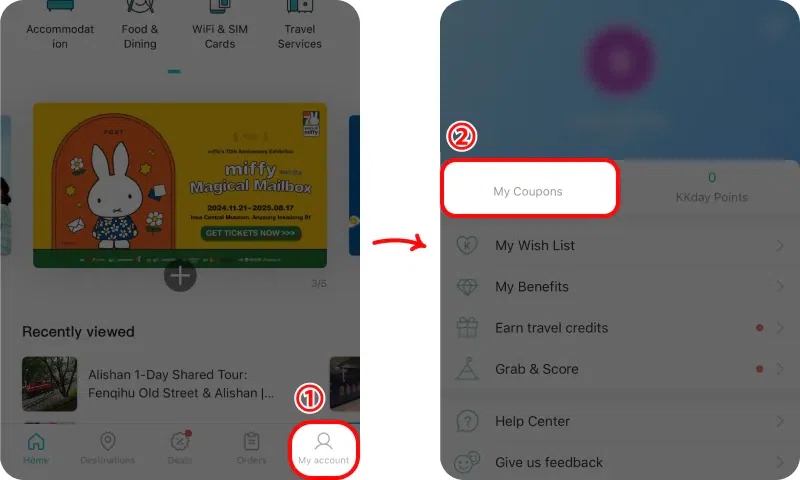
① Open the KKday app and tap “My Account” at the bottom of the screen.
② Select “My Coupons” from the account menu.
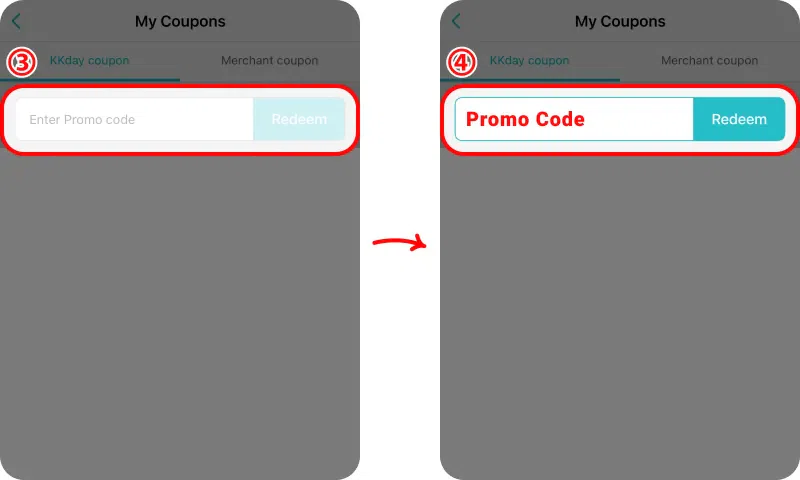
③ In the coupon input field, enter your promo code.
④ Tap “Redeem” to save the coupon to your account.
Once registered, the coupon will appear as available and can be selected automatically during checkout if the booking meets the promotion conditions.
Yes, KKday provides promo codes and coupon deals regularly for travel activities and services.
The best KKday promo codes often apply to first-time users or specific destinations, with additional savings through app deals.
A KKday promo code may not work due to exclusions, minimum booking requirements, or app-only restrictions.
Yes, KKday frequently offers first order promo codes for new users.