

20% OFFCODE
Selected items

This page lists the currently available Booking.com promo codes.
New Promo Codes are added as soon as they become available!
🔎 Exploring available Booking.com Promo Codes
All promo codes listed on this page are manually verified, and only currently working official promo codes are shown.
Expired or invalid codes are removed promptly to ensure accuracy. Actual availability and discount details are subject to the checkout page.
Booking.com offers occasional promo codes for new customers, but discounts are more commonly provided through its Genius loyalty program rather than standard coupon codes. By creating an account and booking through the platform, users can unlock Genius discounts, which offer automatic savings on hotels and accommodations.
Unlike traditional coupon-based platforms, Booking.com uses dynamic pricing and member-based discounts to provide competitive rates. Genius members can receive benefits such as discounted room rates, free upgrades, and complimentary perks depending on the property and booking conditions.
Booking.com also features flexible cancellation policies, daily deals, and location-based pricing variations. For maximum savings, travelers should log in to access Genius pricing, compare multiple properties, and book during promotional periods rather than relying solely on a Booking.com promo code. Monitoring price changes and checking member-exclusive deals is the most effective way to save.
Booking.com promo codes and coupon codes may not work due to the platform’s pricing model and restrictions.
Booking.com offers competitive pricing through its platform, with discounts often built directly into listings.
The Genius program provides additional savings, including 10% to 20% off selected stays, free breakfast, or room upgrades depending on your level.
For the best savings, sign up for Genius membership, use mobile-exclusive deals, and compare multiple listings to find the lowest price.
To redeem a Booking.com promo code, follow the steps below.
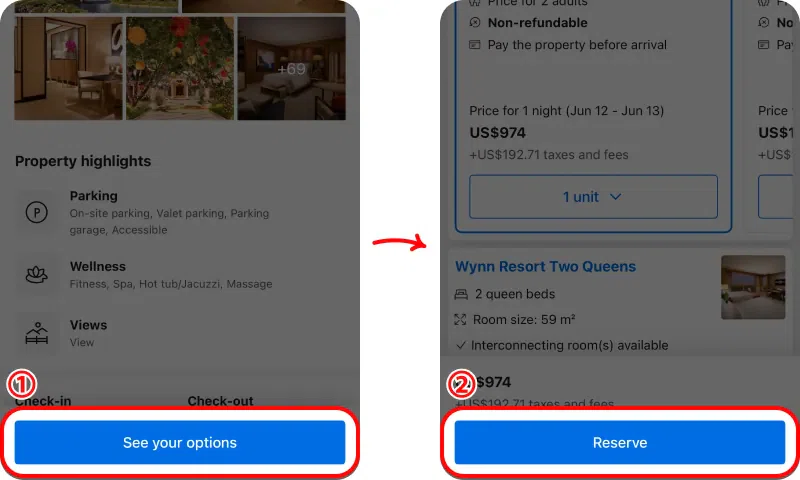
① On the property page, tap “See your options” to view available rooms.
② Select your room and tap “Reserve” to proceed.
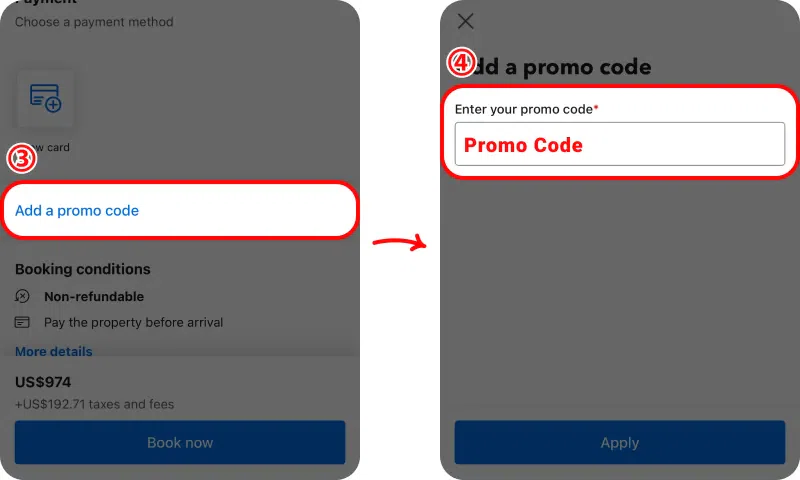
③ On the payment screen, select “Add a promo code.”
④ Enter your promo code and apply it before completing your booking.
Before applying the promo code, the total price is shown at the standard rate including taxes and fees.
After the promo code is applied, the discount is deducted and the updated final total is displayed before confirming your reservation.
Booking.com does not frequently provide promo codes. Most discounts come from its Genius membership and built-in pricing.
Promo codes are rare. The best savings usually come from Genius discounts and mobile deals.
Booking.com may not support active promo codes, or selected properties may not be eligible for discounts.
Yes, Booking.com offers the Genius program, which provides discounts and perks such as free upgrades.