

20% OFFCODE
Selected items

This page lists the currently available Agoda promo codes.
New Promo Codes are added as soon as they become available!
🔎 Exploring available Agoda Promo Codes
All promo codes listed on this page are manually verified, and only currently working official promo codes are shown.
Expired or invalid codes are removed promptly to ensure accuracy. Actual availability and discount details are subject to the checkout page.
Agoda offers occasional first order promo codes for new customers, typically providing discounts on hotel bookings or app-exclusive deals. However, most savings on Agoda come from its pricing system rather than relying solely on coupon codes.
Unlike traditional booking platforms, Agoda frequently provides app-only discounts, mobile rates, and “secret deals” that are only visible when users are logged in. Prices can also vary depending on location, device, and booking conditions, making it important to compare different options before completing a reservation.
Agoda is particularly strong in Asia, where it often offers lower prices than other platforms due to regional partnerships and inventory. For maximum savings, travelers should use the Agoda app, check hidden deals, and compare prices across multiple listings instead of relying only on an Agoda promo code. Monitoring price changes and testing different booking conditions can significantly reduce costs.
Agoda promo codes and coupon codes may not work due to specific restrictions or conditions.
Agoda offers competitive pricing with discounts applied directly to hotel listings, along with additional savings through promo codes and app-only deals.
Agoda membership and regional pricing often provide lower rates compared to other platforms, especially in Asia.
For the best savings, combine an Agoda promo code with app-exclusive discounts and take advantage of localized promotions.
To register an Agoda promo code, follow the steps below.
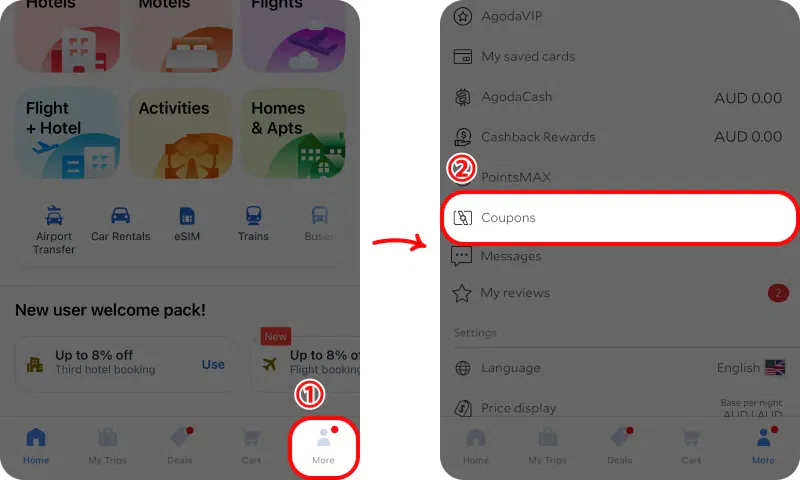
① Tap “More” at the bottom of the Agoda app.
② Select “Coupons” from the menu.
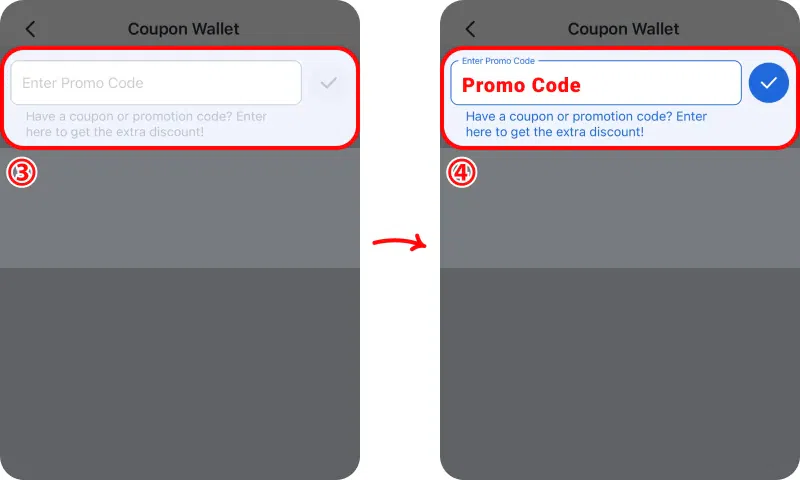
③ Tap “Have a code?” to open the promo code input section.
④ Enter your promo code and confirm to add it to your Coupon Wallet.
Once registered, the promo code will be saved in your account and ready to use during booking.
To redeem an Agoda promo code, follow the steps below.
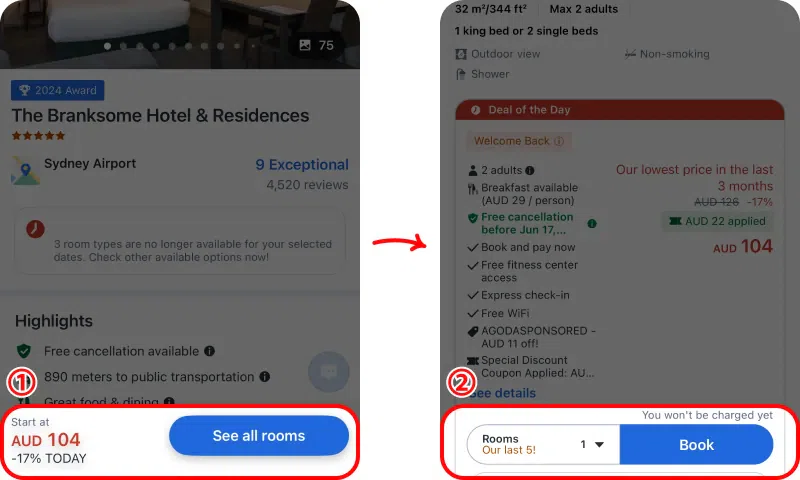
① On the property page, tap “See all rooms” at the bottom to view available room options.
② Select your preferred room, then tap “Book” to proceed with the reservation.
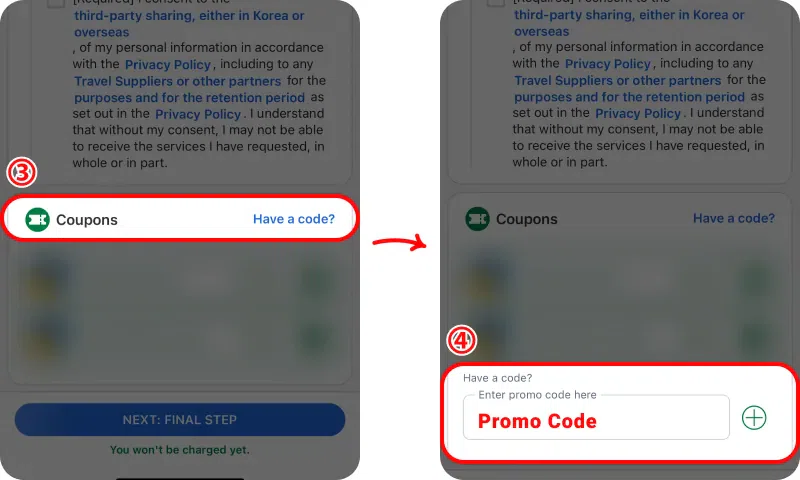
③ Tap “Have a code?” to open the promo code input section.
④ Enter your promo code and confirm to add it to your Coupon Wallet.
Once registered, the promo code will be saved in your account and ready to use during booking.
When booking a hotel, the price before applying the coupon shows the standard rate with no discount. After the promo code is applied, the discounted price is automatically reflected, and you can see the reduced final total before completing your booking.
Yes, Agoda provides promo codes and coupon codes regularly, especially for hotels and app bookings.
The best Agoda promo codes usually offer around 5% to 10% off selected bookings, with additional deals through the app.
An Agoda promo code may not work due to exclusions, minimum booking requirements, or app-only restrictions.
Yes, Agoda provides member pricing and special rates for registered users.